Every simulator, one menu bar click away
A macOS menu bar app that lists, starts, stops, creates and deletes your iOS, tvOS, watchOS and visionOS simulators without opening Xcode. Built for developers who juggle device combinations all day.
Key Features
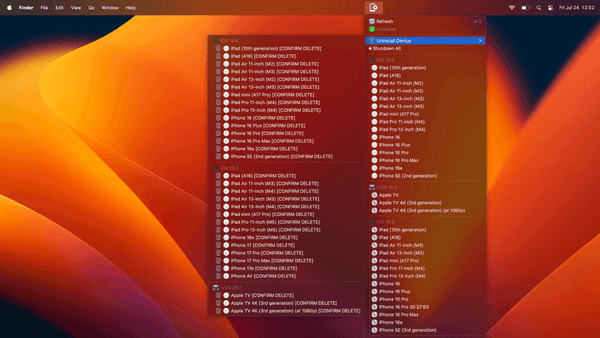
Click any simulator name in the menu to start or stop it, with a green dot for running, white for stopped and a disc icon when the runtime isn't installed.
iOS, tvOS, watchOS and visionOS simulators, grouped by platform and version and refreshed on demand.
Add new simulators from the full device type list using the latest compatible runtime, or delete existing ones — running devices are shut down first.
Why We Built This
Xcode is a heavy way to boot a simulator
Managing simulators means digging through Xcode menus or memorising xcrun simctl invocations, and you can realistically only run a couple at once before your machine starts complaining. This lives in the menu bar instead: click the icon, see every simulator grouped by platform and version with a green dot on the running ones, click a name to toggle it. Shutdown All frees resources in one click, and old devices can be deleted to reclaim disk space.
Only a couple of simulators can run at once before performance degrades, so knowing what's running — and killing it fast — matters more than it should.
Nothing tells you which simulators are booted without running a terminal command. Green and white dots in the menu bar answer that instantly.
Runtimes and devices pile up across projects and eat disk. Deleting them normally means Xcode's Devices window or simctl delete by UDID.